


 Distributors
  SDS Download
  Contact
 Partner Login
Enter your username and password here on order to log in on the partner portal:
No registered partner yet?
Register nowWhy Choose Industrial Inkjet Printing for Your Business?
Industrial Inkjet Printing is changing how manufacturers decorate, code, and customize products. Smithers’ report, The Future of Inkjet Printing to 2029, identifies packaging, labels, and industrial decoration as important growth areas. Its findings reflect a practical shift toward shorter runs, faster changeovers, and reduced material waste.
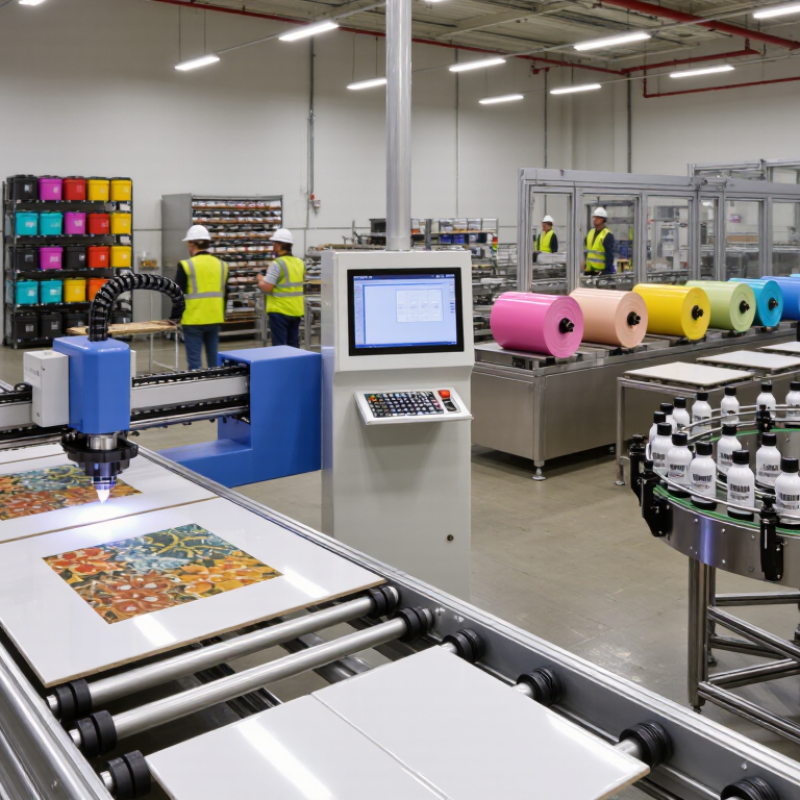
The value is visible on the factory floor. A ceramic tile line can replace multiple screens with a digital printhead system. A packaging plant can alter artwork without producing new plates. A product team can test a small batch before committing to thousands of units. These advantages support version control, personalization, and more responsive production.
Marco Boer, vice president of IT Strategies, described the strategic change clearly: “Inkjet is not a technology; it’s a business model.” That view matters. Industrial Inkjet Printing works best when equipment, ink, substrates, software, and workflow are planned together. Buying a printer alone will not solve production problems.
The technology is not perfect.
Nozzle maintenance remains essential. Ink adhesion can vary across plastics, metals, glass, and coated materials. Drying systems may affect energy use and line speed. Operators also need reliable color management and inspection tools. These details can determine whether a promising trial becomes a profitable process.
Smithers’ market analysis supports continued investment, but every business should test its own economics. Compare uptime, labor, ink consumption, waste, service needs, and changeover time. The strongest decision is rarely based on headline speed. It comes from measurable performance under real production conditions, where dust, deadlines, and imperfect substrates are unavoidable.
What Is Industrial Inkjet Printing?
Industrial inkjet printing is a contactless process that places tiny ink droplets onto products or materials. A printhead moves across, or above, the production line. Digital signals control each droplet’s position, size, and color. This method can mark cartons, cables, metal parts, bottles, labels, and flexible films. It supports batch codes, dates, serial numbers, barcodes, and changing artwork without physical plates.
In practical production environments, operators value its speed and flexibility. The system can print variable information while products keep moving. It also reduces setup time for short runs and frequent design changes. However, it is not a magic solution. Ink adhesion depends on surface texture, moisture, dust, and coating quality. Poor maintenance may cause blocked nozzles or uneven marks. Testing the actual material remains essential. A clean sample can still hide problems under factory conditions.
Tips: Check print clarity after handling, heat exposure, and storage. Match the ink to the substrate and production speed. Keep printheads aligned and inspect them regularly. Record test results, even when they look ordinary. Small differences often reveal larger process issues. A production team should also review ventilation, curing requirements, and operator training before installation.
| Dimension | Industrial Inkjet Printing | Business Relevance |
|---|---|---|
| Definition | A non-contact digital printing process that deposits microscopic droplets of ink directly onto a product, package, sheet, web, or other substrate. | It enables variable-data and short-to-medium production runs without the printing plates required by conventional analog processes. |
| Core Technology | The two main drop-generation technologies are continuous inkjet, which continuously produces and selectively deflects droplets, and drop-on-demand inkjet, which ejects droplets only when required. | Manufacturers can select a technology according to production speed, print distance, ink requirements, resolution, and application conditions. |
| Printhead Operation | Industrial systems commonly use fixed printheads for single-pass production or moving printheads for scanning or multi-pass printing. | Single-pass configurations support inline, high-throughput production, while scanning systems can provide greater flexibility for changing product sizes and artwork. |
| Compatible Substrates | Depending on the ink and curing method, systems can print on paper, coated and uncoated films, plastics, glass, metals, ceramics, textiles, wood, and prepared or treated surfaces. | Substrate compatibility allows one digital platform to serve packaging, product identification, décor, textiles, direct mail, and industrial marking applications. |
| Ink Types | Industrial inkjet systems may use water-based, solvent-based, UV-curable, resin, pigment, dye, or specialty functional inks. The correct choice depends on adhesion, durability, color, drying, and regulatory requirements. | Ink selection affects print permanence, food-contact suitability, chemical resistance, drying time, surface compatibility, and operating cost. |
| Drying and Curing | Printed ink may dry through evaporation, absorption, oxidation, heat, or ultraviolet curing, depending on the formulation and substrate. | Fast drying or curing can support immediate finishing, rewinding, handling, or packaging, but it may add energy use and equipment requirements. |
| Variable Data | Digital files can be changed from one item to the next without replacing plates or stopping for mechanical artwork changes. | Businesses can print serial numbers, barcodes, QR codes, dates, personalization, regulatory information, and localized content during production. |
| Production Flexibility | Artwork, text, graphics, and data can be modified through the digital workflow, making the process suitable for multiple versions and frequent design changes. | It reduces setup associated with version changes and supports customized products, regional packaging, seasonal campaigns, and on-demand manufacturing. |
| Setup and Changeover | Digital printing generally requires fewer physical setup steps because images are generated from digital files rather than printing plates or cylinders. | Shorter changeovers can improve equipment utilization and make smaller production batches more practical. |
| Print Quality | Image quality depends on drop size, printhead resolution, ink chemistry, substrate surface, dot control, color management, and curing or drying conditions. | Consistent substrate preparation and process control are essential for sharp text, readable codes, smooth gradients, and repeatable color. |
| Production Speed | Speed varies substantially by print width, resolution, ink coverage, number of colors, substrate, drying method, and machine configuration. Single-pass systems are designed for continuous high-throughput production. | Capacity should be evaluated using the required finished quality, coverage, and workflow—not only the machine’s advertised maximum speed. |
| Waste Profile | Digital inkjet can reduce plate-making waste, setup sheets, and excess inventory associated with preprinted versions. Waste can still result from substrate trim, startup conditions, cleaning, and rejected prints. | Lower setup waste is particularly valuable for short runs, frequent artwork changes, and products with many versions. |
| Inventory Management | Printing closer to the time of use can reduce the need to store large quantities of preprinted packaging or labels. | On-demand production may lower obsolescence risk when designs, compliance information, prices, or product details change frequently. |
| Automation and Integration | Industrial inkjet equipment can be connected to prepress software, production planning systems, inspection cameras, databases, and finishing equipment. | Workflow integration supports automated job preparation, traceability, quality checks, variable-data control, and reduced manual intervention. |
| Maintenance Requirements | Regular tasks may include printhead cleaning, nozzle monitoring, ink-system checks, filter replacement, environmental control, and calibration. | Planned maintenance helps prevent blocked nozzles, banding, color variation, unplanned downtime, and inconsistent print quality. |
| Operating Environment | Temperature, humidity, dust, substrate cleanliness, ink viscosity, and curing conditions can influence jetting reliability and image quality. | A controlled production environment can improve uptime and reduce defects, especially when using high-resolution printheads or sensitive ink systems. |
| Common Applications | Typical applications include labels, flexible packaging, corrugated packaging, commercial print, direct mail, product coding, ceramic décor, textiles, signage, and industrial marking. | The technology is suitable for businesses that require a combination of durable identification, frequent version changes, customization, and digital workflow control. |
| Key Advantages | Plate-free production, variable-data capability, fast changeovers, reduced setup waste, on-demand manufacturing, and compatibility with automated workflows. | These advantages can improve responsiveness and reduce the operational burden of producing many short or customized jobs. |
| Important Limitations | Results may be affected by substrate treatment, ink adhesion, drying or curing capacity, printhead maintenance, color matching, and the economics of very long runs. | A technical trial and total-cost evaluation should be completed before selecting equipment for a specific product and production volume. |
| Best-Fit Business Conditions | Industrial inkjet is especially suitable where products require frequent artwork changes, personalization, short or variable runs, digital traceability, or direct-to-object printing. | Businesses with stable, extremely long runs and minimal design variation may need to compare digital inkjet with other printing processes for overall cost efficiency. |
Related Posts
-
Ultimate Guide to Choosing the Best Cij Printer for Global Procurement Success
-
Understanding the Benefits of Inkjet Coders in Modern Packaging Industries
-
Why Choose an Inkjet Coder for Your Business Needs?
-
Understanding the Differences Between Continuous Inkjet Printers and Other Coding Technologies
-

How to Choose the Right Industrial Printer Machine for Your Business Needs
-

How to Optimize Production Efficiency with an Industrial Inkjet Printer
